How to Govern the Power Platform Default Environment
Why the Default Environment Is Always the First Governance Decision
Every Power Platform tenant starts with the same thing. A Default Environment that already exists, that everyone can access, and that feels harmless because it was there before anyone made a decision. That is exactly why it becomes a problem so quickly. In Part 0, I talked about how governance starts with mindset, not settings. The Default Environment is where that mindset gets tested immediately. The Default Environment does not wait for governance to be ready. It quietly becomes the place where people try things, solve small problems, and accidentally create things that matter. It is a bit like moving through a level that looks simple at first, until hidden passages, shortcuts, and drops reveal how much depth was there all along.
What makes the Default Environment dangerous is not that it is powerful. It is that it is vague. There is no clear purpose attached to it. No shared understanding of what is allowed there and what is not. For makers it feels like neutral ground. For admins it often feels like a box full of snakes. In reality it becomes the first development environment, the first production environment, and the first place where responsibility dissolves.
If you do not decide what the Default Environment is for, your makers will decide for you. Not out of malice, but out of convenience. They build where access already exists. They share because sharing is easy. They rely on licenses and features they did not actively choose. None of this feels wrong in the moment. The problems only appear later, when an app suddenly has many users, when a flow becomes business critical, or when support questions land on a desk that never agreed to own the solution.
This is why the Default Environment is always the first governance decision. Not because it is the most complex one, but because it sets expectations. The moment you define what the Default Environment is and what it is not, you remove ambiguity. You reduce accidental risk. You give makers orientation instead of leaving them to guess. Every other governance decision becomes easier once this one is clear.
To sum it up:
- You have it, whether you like it or not.
- Everyone has access (yes, everyone, even externals and guests).
- Can’t be administerd with Security Groups.
- You can’t create any backups…*
‘*’ That point is a bit confusing. The documentation states, that Microsoft “don’t support restoring a system backup of the deafult environment”, which sounds like there are no automatic backups. The quote “You can create these (manual backups) for production and sandbox environments, but not for the default environment” even sounds like, there’s no possibility to create manual backups either, leaving you without anything (see Back up and restore environments). But another article on learn.microsoft.com tells us, that you can indeed get access to backup data of your default environment, you just have to work with the Microsoft support (Back up and restore the default environment)
Since everyone has access and it’s tricky to manage, you should definetly decide, how to handle the default environment properly, then.
The Three Valid Models for the Default Environment (Pick One)
There are many ways people talk about the Default Environment, but in practice there are roughly three models that actually work. The mistake is not choosing the wrong model. The mistake is mixing them without realizing it, or not choosing one at all. Once that happens, the Default Environment becomes unpredictable, and unpredictability is what creates governance debt. Choosing a model is not a technical decision. It’s the direct result of answering those four questions from Part 0. What do you want to enable? What do you want to protect? Where do you accept risk? Where don’t you? Your answer determines which model fits your organization. There is no universally correct choice, only the one that matches your governance mindset.
Model One: Personal Productivity Only (my personal recommendation ⭐)
This model treats the Default Environment as a place for individual work. Makers can create personal flows or small helper apps for themselves, but nothing that is meant to be shared with teams or relied on by a department. The Default Environment is not a collaboration space and not a delivery platform. It is a personal toolbox.
This model can work well if it is clearly communicated and consistently enforced. The moment team apps or shared processes appear here, the model breaks. Without clear boundaries, personal productivity quietly turns into shadow production.
Model Two: Tolerated but Discouraged
In this model, makers are technically allowed to build in the Default Environment, but it is made clear that this is not the place for anything important. Apps and flows are monitored, and there is an expectation that relevant solutions will eventually be moved elsewhere.
This approach is often chosen in existing tenants where activity already exists and an immediate lockdown would cause too much friction. It can be a pragmatic transition phase, but it only works if the rules and the consequences are visible. If nothing ever happens to important solutions in the Default Environment, this model loses credibility.
Model Three: Locked Down for Makers
This model treats the Default Environment as an admin controlled space. Makers are not expected to build there at all. Instead, they are redirected to a dedicated environment that was created specifically for learning and building.
This provides the highest level of clarity, but it also requires preparation. Locking down the Default Environment without offering a real alternative only creates frustration and workarounds. The restriction must always come with a clear explanation of where makers should go instead.
All three models can be valid. What does not work is blending them. Allowing personal apps, tolerating team solutions, and occasionally treating the Default Environment as production creates confusion for everyone involved. Makers cannot know what is safe to build. Admins cannot explain why one solution is a problem and another is not. Governance turns into a series of exceptions instead of a system.
Pick one model and commit to it. Write it down. Communicate it. Apply it consistently. Once that decision is made, the Default Environment stops being a gray area and starts becoming a predictable part of your platform.
[Personal recommendation: I strongly prefer the first approach. Everything that is only valid for my personal productivity can live there, as long as it’s compliant with the DLP policy.]
The Real Risk: Invisible Sharing and Accidental Scale
The real problem with sharing to everyone is not that ownership disappears. It is that the person who shares usually has no idea who everyone actually is.
When makers click share with everyone, they are almost never thinking about an Entra ID group that dynamically includes every user account in the tenant.
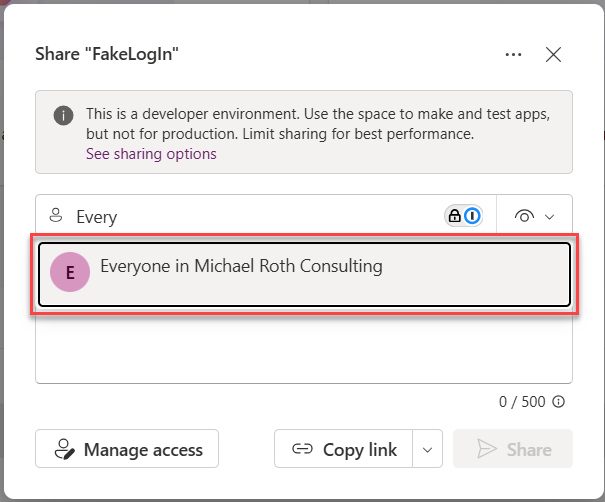
They are thinking about their colleagues, their team, or maybe their department. The technical reality behind that button is very different. Depending on how the group was defined, everyone can include all internal users, all external guest users, and in some cases even service accounts or managed identities. And most likely all B2B guest users as well. It’s basically user.objectId -ne null 😁 (see also Matt Chatt - “All Users” in Entra ID means ALL users and guests). In Intune contexts, similar concepts can even include devices. None of this is visible at the moment of sharing.
This gap between intention and reality is the real governance risk. A maker believes they are helping their colleagues. In reality, they might be exposing an app or flow to people they never considered, including external guests who happen to exist in the directory. The platform does exactly what it is configured to do, but the person clicking the button has no mental model of the scope they are granting access to.
This is why sharing with everyone is dangerous in the Default Environment. Not because users are careless, but because the platform makes it too easy to apply a directory wide permission without explaining what that actually means. Scale happens instantly and silently, without a conscious decision to widen the audience.
Disabling sharing with everyone is not about locking things down. It is about forcing alignment between intention and outcome. When someone has to choose a concrete group or set of users, they are much more likely to understand who they are giving access to. That small moment of friction restores visibility, and visibility is what prevents accidental exposure.
If you want a detailed technical explanation of how the everyone group works and why it is so broad, I have already written a dedicated post about that: Disable Sharing with All . In the context of the Default Environment, the important part is this: if users cannot accurately predict who will get access, the option should not exist.
Licensing Chaos Starts Here (Trials, Viral, Self-Service and Auto-claim Policies)
Remember what I said in Part 0: defaults are dangerous when left unreflected. Nowhere is this more true than with licensing in the Default Environment. Trials, viral plans, self-service purchases, auto-claim policies, all of these are enabled by default, and all of them turn experimentation into obligation without anyone consciously deciding to scale. Licensing problems in Power Platform rarely start with bad intent. They start with convenience. The Default Environment makes powerful features feel immediately available, while hiding the implications behind them. From a maker perspective, things simply work. From a governance perspective, commitments are created without anyone consciously agreeing to them.
This is why licensing chaos almost always starts here.
Why Licensing Feels Invisible to Makers
Most makers do not think in licenses. They think in features. A connector works. Dataverse is available. A flow runs successfully. The underlying license model stays out of sight, and that is exactly the problem.
The platform optimizes for speed and experimentation. It removes friction at the moment of creation. That is helpful for learning, but dangerous once solutions are shared or relied on. When licensing is invisible, people build without understanding what they are building on.
Trials and Viral Plans: Temporary Foundations and Silent Spread
Trials and viral plans follow the same pattern. They make premium capabilities available without requiring a conscious decision. Makers can experiment freely, but the moment something becomes useful, it already relies on a licensing model nobody explicitly chose.
Trials invite exploration, but they expire silently. A maker can build something useful without realizing that the foundation is temporary. When the trial ends, the solution stops working, even though users may already depend on it.
Viral plans create a different kind of invisibility. Capabilities spread across the tenant without central awareness. From the outside, everything looks licensed. From the inside, nobody can reliably explain why.
I have already written in detail about how trials and viral plans work and why disabling or reducing them is often necessary for sustainable governance. I will link those articles here for readers who want to go deeper into the technical and administrative details.
Self Service Purchases: When Money Enters Without Governance
Self service purchases add a financial dimension to the same problem. A user needs something quickly, buys a license, and moves on. No approval. No shared understanding. No plan for long term use.
Once the license exists, expectations exist as well. IT and finance usually find out later, when a solution is already considered important. At that point, removing or changing it feels disruptive, even though nobody explicitly agreed to support it.
I have also covered self service purchases in a separate post that explains how to disable them and what changes for users and admins. That post will be linked here to avoid repeating the technical steps.
Auto Claim Policies: When a Click Becomes a Contract
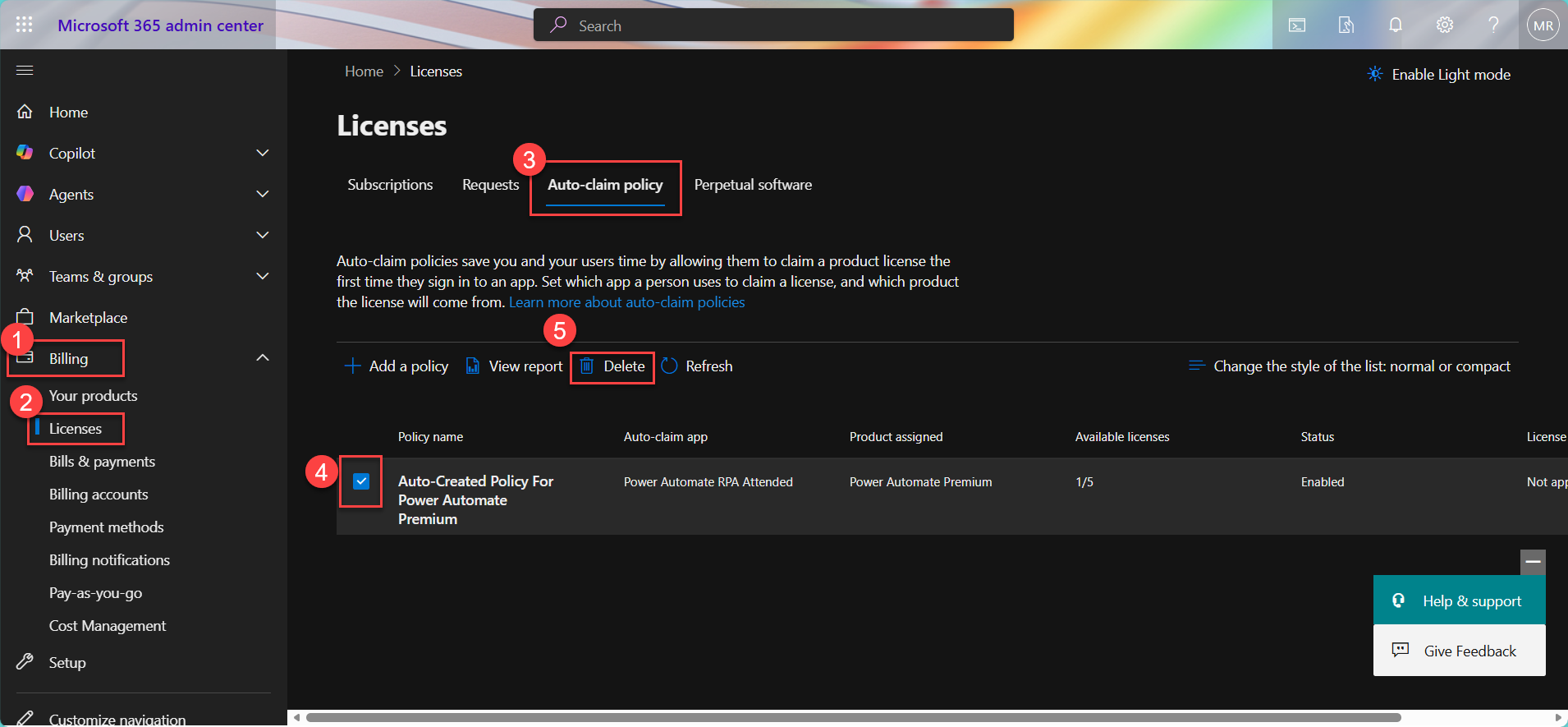
Auto claim licenses take invisibility one step further. When enabled, the platform automatically assigns a premium license the moment a user interacts with a premium feature. There is no warning and no decision point. From the user perspective, nothing changes. From a governance perspective, a commitment has already been made. And until today it’s not clear, whether it’s turned on or off by default ⚠️
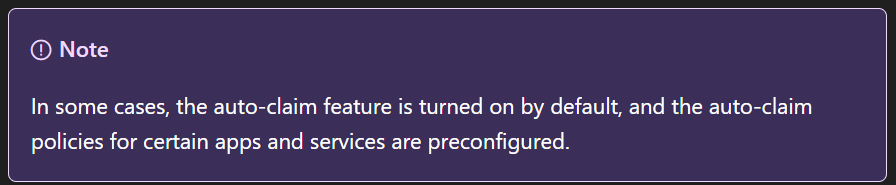
This turns exploration into obligation. A user does not decide to use premium features. They discover later that they already did. Cost is created without intent, and dependencies are established without awareness.
Now combine this with sharing to everyone - do you see where this could go? A single app or flow built with a premium feature can be shared broadly in the Default Environment. Every user who interacts with it can trigger an automatic license assignment. What started as a small experiment can suddenly result in exploding licensing costs, without anyone actively choosing to scale the solution.
Auto claim is often justified as a way to reduce friction. In practice, it removes the moment where governance should happen. Finance notices later. Admins investigate later. Users are surprised later. By the time the issue is visible, the cost and the dependency already exist.
Disabling auto claim does not block premium usage. It restores the conversation. When a premium license is needed, that need should be explicit. Requests create awareness. Awareness creates responsibility.
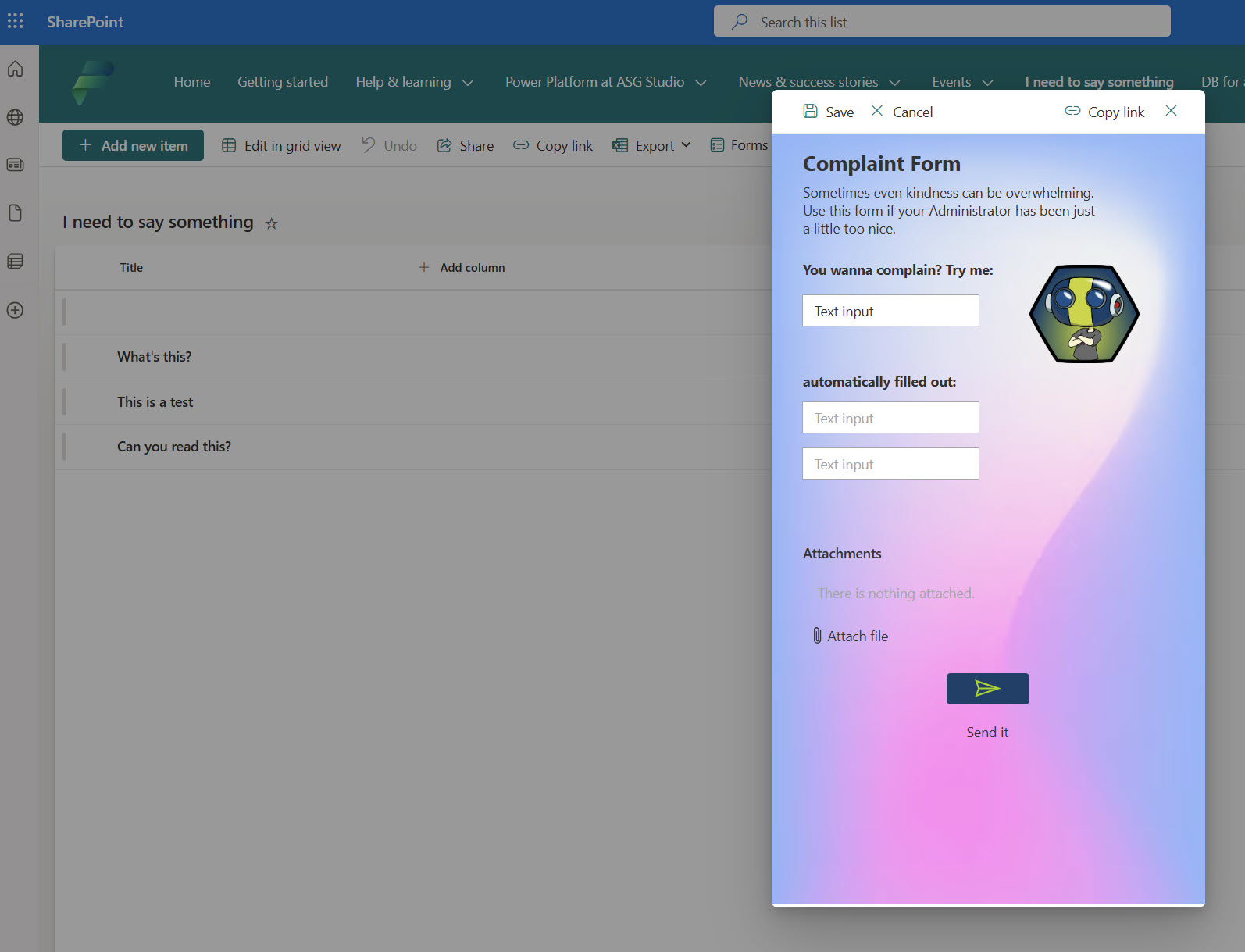
[Here is a quick info screen, how to detect and delete auto-claim policies in your M365 Admin Center
 ]
]
Why the Default Environment Is the Wrong Place for All of This
The Default Environment is shared by everyone and owned by no one. Allowing trials, viral plans, self service purchases, and auto claim policies here means accepting that important solutions will be built on unstable ground.
Reducing or disabling these mechanisms in the Default Environment is not about control. It is about predictability. Makers should not unknowingly build on licenses that disappear.
Admins should not be surprised by costs or dependencies they never approved.
Licensing governance is not a financial exercise first. It is a reliability exercise. If people know what they are building on, fewer things break later.
How Violations are Handled
Deciding and documenting the rules for the Default Environment is not enough by itself. If you do not also define what happens when those rules are broken, you end up with silent governance. Makers will unknowingly continue building in ways that violate your strategy, and admins will discover problems only when they have already become costly or disruptive.
One of the most effective ways to handle violations is to combine communication with enforcement in a way that reflects the model you chose for the Default Environment.
Communicate First
Before anything is enforced, makers need to know what the rules are and why they exist. One excellent way to do this is by creating a central place where guidance lives and where makers can orient themselves as soon as they enter the Default Environment.
Microsoft provides guidance on using a Power Platform hub as a communication and community space for makers. A Power Platform hub site gives your makers a one-stop destination for:
- where to build apps and flows
- environment purpose and boundaries
- governance policies and lifecycle expectations
- how to reach support teams
This hub can be a SharePoint or Teams communication site that lives with your makers and becomes the canonical source of truth for what is allowed in each environment. The official Learn article shows how you can set up such a hub and what content it can include.
This communication space becomes especially relevant when your enforcement logic refers readers back to it. For example, when a maker sees a custom DLP violation message, that message can link directly to your internal hub so they understand the context without having to ask someone (If you don’t know how to customize your DLP error message, read the blog I’ve published about it).
This communication space becomes especially relevant when your enforcement logic refers readers back to it. For example, when a maker sees a custom DLP violation message, that message can link directly to your internal hub so they understand the context without having to ask someone.
Reactive Controls: DLP Plus Automated Detection
Technical controls are your second line of defense. In the Default Environment this usually starts with a strict Data Loss Prevention policy that reflects the model you have chosen (personal productivity only, locked down or tolerated but discouraged).
The rule is simple: the policy should match the level of permission you explicitly want to allow in that environment and not more.
But a strict policy alone does not handle violations. You also need a way to detect when someone has built or shared something that goes against the policy or the environment purpose.
This is where automation comes in. A scheduled flow can run against your tenant to detect violations such as:
- apps or flows that were created where they should not be
- use of blocked connectors
- solutions that have been over-shared or shared in violation of your model
- resources that exceed the intended scope of the Default Environment
Once this flow identifies a violation, you can decide what happens next. Options include:
- notify the owner with a clear explanation and a link to your governance hub for context
- send a message to a support mailbox or Teams channel so an admin can follow up
- automatically move, clean up, or remove the offending resource if it clearly violates the model and no owner responds in a given timeframe
The power of this approach is that it supports your governance with feedback loops instead of silent enforcement. Makers learn from notifications, not from surprise deletions. Admins stay in control without having to manually check everything.
Why This Matters for Default Environment Governance
The Default Environment is shared by everyone and does not have natural checkpoints. Everything you choose to allow here will happen at scale unless you actively enforce the rules. Simply naming rules is not enough. You have to build:
- public orientation so makers know the rules
- automated signals so violations are visible
- clear next steps so issues are resolved predictably
That combination turns your governance strategy from a document that nobody reads into an active system that guides behavior.
The official Microsoft guidance on managing the Default Environment also encourages using actions and telemetry to see what is happening inside it so you can make informed decisions.
Where Makers Should Go Instead
Locking down the Default Environment without offering an alternative is not governance. It is friction. If people do not know where they are supposed to build, they will either stop experimenting or work around the rules. Both outcomes are bad for adoption and trust.
Every restriction must come with a clear path forward. When you limit what is allowed in the Default Environment, you must also define where makers can safely experiment, learn, and build without fear of doing something wrong.
This can take different forms. Some organizations use environment routing through managed environments to guide makers automatically to the right place. Others create a dedicated environment with a clear name like “Makers Lab” or “Makers Playground”. The name matters less than the intent. This environment exists to encourage learning, experimentation, and early ideas without the pressure of production expectations.
What matters is that makers know this space is meant for them. It should be easy to access, clearly described, and intentionally less restrictive than the Default Environment. At the same time, it should still reflect your basic governance principles so that learning does not happen in a vacuum.
Giving makers room to experiment is not the opposite of governance. It is part of it. When people have a safe place to try things, they are less likely to misuse shared or restricted environments. Clear boundaries combined with a welcoming alternative create confidence. Confidence leads to better solutions, and better solutions are easier to govern later.
Locking things down is easy. Guiding people forward take
The Minimum Default Environment Baseline (Checklist)
If you want a Default Environment that does not quietly turn into your biggest governance problem, you need a small and explicit baseline. Not a perfect setup. Not a future vision. Just the minimum that makes the environment predictable.
At a minimum, the Default Environment should meet the following conditions:
-
Sharing with everyone is disabled so makers must consciously choose who they give access to. This prevents accidental tenant wide exposure and forces alignment between intention and reality.
-
Trials and viral plans are reduced or disabled so solutions are not built on licenses that expire or spread without awareness. Makers should not unknowingly rely on temporary foundations.
-
Self service purchases are disabled so licenses are not bought and used without governance, ownership, or long term support expectations.
-
Auto claim policies are disabled so premium licenses are only assigned through an explicit decision and not as a side effect of experimentation or sharing.
-
A strict but intentional DLP policy is applied that reflects what the Default Environment is actually meant for. The policy should prevent obvious misuse without pretending to solve every security problem.
-
A scheduled process exists that detects violations and notifies owners with clear guidance. Whether this leads to migration, cleanup, or removal depends on the model you chose, but silence should never be the outcome.
-
A clear alternative environment exists for makers, and people know where it is and why it exists.
If you can check all of these boxes, your Default Environment is no longer a gray area. It becomes a defined part of your platform instead of an accident waiting to happen.
Closing Thoughts
The Default Environment is not where most Power Platform solutions should live, but it is where most governance problems begin. That is why it deserves a decision early, even if the rest of your governance model is still evolving.
You do not need to get everything right on day one. What matters is that you remove ambiguity. Makers should know what the Default Environment is for. Admins should know what to expect there. And violations should lead to learning and action, not surprise and frustration.
Once this foundation is in place, every other governance decision becomes easier. Security policies make more sense. Licensing becomes more predictable. Conversations with makers become calmer and more productive.
In the next part of this series, we will move on from the Default Environment and look at how to create one safe place to build. A place that invites experimentation without creating accidental production systems. Because if you restrict the Default Environment without offering an alternative, you have not created governance, you have just created frustration. Part 2 is where we fix that.
And in the end, governance without decisions is not governance. It’s just drift 🤷♂️
I hope you liked this blog. Feel free to find me on LinkedIn if you have questions, want to work with me, or just want a nice chat 😎